
Payroll Export
CSV export of hours and gross pay per tech for a date range. Simple weekly OT (1.5x over 40).
Payroll Export turns time entries (and approved expenses) for a date range into a CSV, with simple weekly overtime applied. It is built to hand to your bookkeeper or drop into your real payroll system (Gusto, ADP, and the like).
Not a full payroll engine.
Manuall does not compute tax withholding, California daily overtime, or meal-break compliance. It is a time-to-CSV utility. For full-stack payroll, integrate with Gusto, ADP, or similar.
Running an export
- Sidebar -> Payroll Export.
- Pick a date range (defaults to the last pay period).
- Optional: filter by employee.
- Click Export. The CSV downloads.
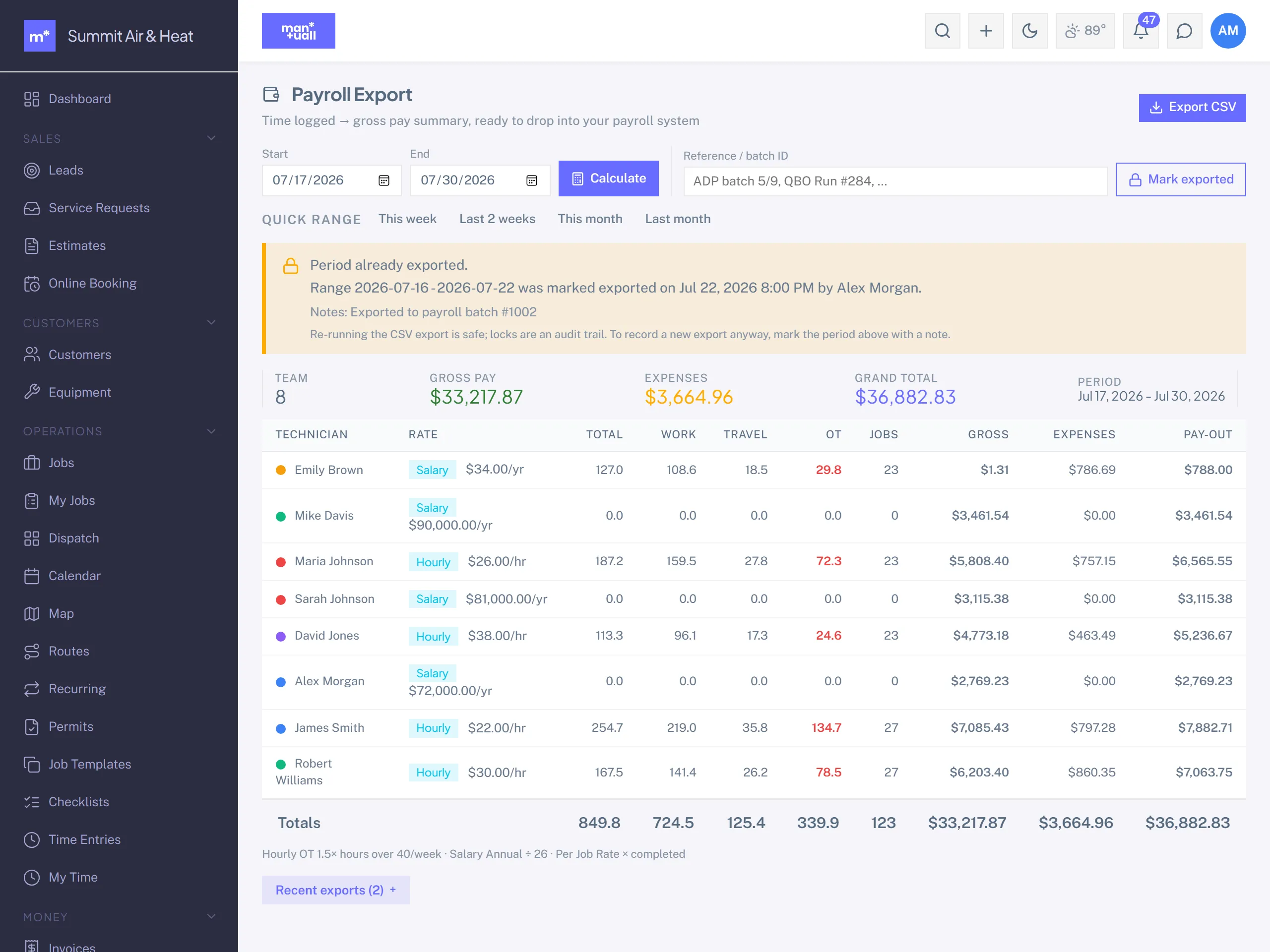
Once you export a period, Manuall locks it so you don't accidentally run the same range twice.
Overtime and pay types
Hours over 40 in a week (Monday start) are paid at 1.5x. Each employee is paid by their type: Hourly (regular plus overtime), Salary (prorated across the period), or Per-job (job count times rate).
CSV columns
- Employee name and ID.
- Regular hours, overtime hours.
- Work vs Travel hours.
- Gross pay.
- Expense total (approved expenses in the range).
- Job count.
Plan tier
Payroll Export is on Professional and up.