
For Admins
Configure billing, roles, integrations, vertical packs, and shop-wide policy.
For AdminAdmin is the configuration tier. You own billing, users, roles, and integrations. You don't usually run jobs yourself (that's a Manager or Dispatcher day), but when the team hits a permission wall, a plan-tier surprise, or a setting that needs changing, the screen they need is one only you can open.
What an Admin day looks like
9:00 am: scan the shop
Open the Dashboard. You're confirming the picture, not hunting for surprises: today's jobs, this week's revenue, the Outstanding tile, your active user count against your plan. Anything that doesn't match the picture in your head is a five-minute look, not a project.
The admin-only signal to watch in the header: your active user count against your plan's included seats. If you've nudged past them (usually after a hiring run), this is where it shows. A little headroom means you won't be cut off mid-hire, but Settings -> Billing is where you move up a tier or deactivate someone who left.
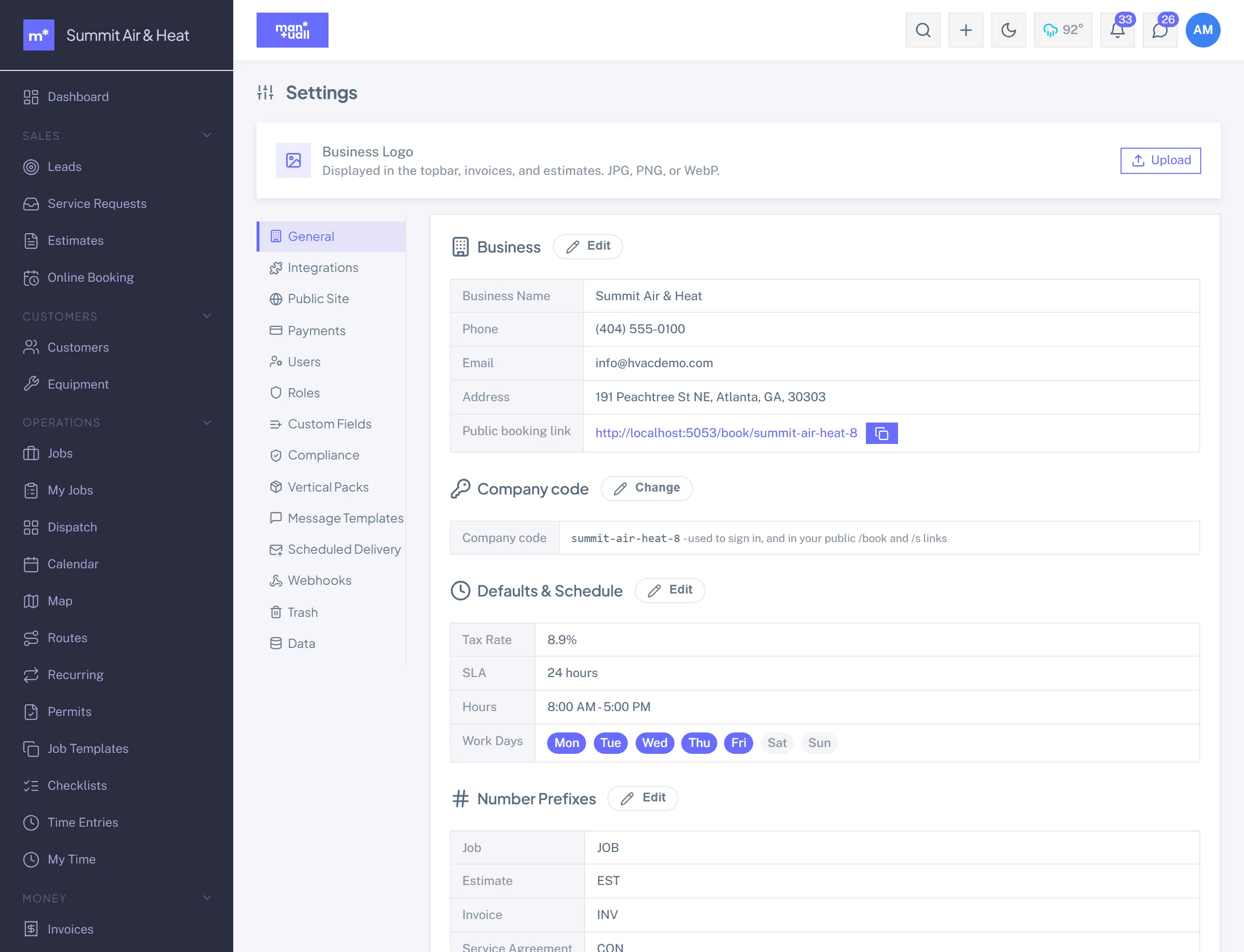
9:15 am: Settings -> General
Once a quarter, usually. More often if you just rebranded, moved, or changed your tax rate.
- Business name and logo flow onto every customer-facing document and the portal welcome line.
- Number prefixes for Job, Estimate, Invoice, Contract, Credit, and Change Order. Bookkeepers care; if you change them mid-year, talk to your accountant first.
- Default tax rate and working hours. The slot finder and calendar bend around the hours; the tax rate flows into every new invoice.
9:40 am: Settings -> Users
The most-touched tab. Three jobs:
- Invite a new hire. Name, email, role. Manuall sends a link good for 48 hours. They set their own password.
- Deactivate a leaver. Toggle Active off. Their history (time entries, completed jobs, audit rows) stays attached to them, and their seat opens up. Manuall counts active users for billing, not total accounts.
- Reset a password. Prefer the self-serve "Forgot password" link; second-best is to regenerate their invite; an admin-set password is the last resort.
The last-admin guard.
Manuall counts active admins on every change. If your edit would leave nobody with admin access, the save is rejected with a clear error. Always have a second admin before you go on vacation.
10:10 am: Settings -> Roles (only when you need a non-standard one)
The four built-ins (Admin, Manager, Dispatcher, Technician) cover most teams. When they don't (a senior tech who should see customer history, a bookkeeper who reads invoices but can't edit them), build a custom role. Each feature gets a V/C/E/D checkbox: View, Create, Edit, Delete. Tick what the role needs, save, and anyone assigned inherits it on their next request. Full walkthrough: Custom roles & permissions.
11:00 am: Custom Fields, Vertical Packs, Templates
- Custom Fields: capture a question Manuall doesn't ship a field for (HOA contact, gate code, brand preference). Business tier.
- Vertical Packs: added a trade line? Apply the matching pack to layer in its custom fields, job templates, services, and checklists. Re-applying is safe; your customizations stay.
- Templates: the SMS and email messages Manuall sends. Edit the auto-send ones before your first customer sees them: "Job scheduled," "Tech on the way," "Job completed," "Overdue reminder," "Survey follow-up."
Across the day: the background pulse
- Audit Log (Business tier): once a week, scan the past week's deletes. Anything that shouldn't have gone is one click from Trash -> Restore.
- Email Log: when a customer says "I never got the invoice," this answers it on the spot.
- Billing: still the right plan for your team size?
What only an Admin can do
| Area | Why it's Admin-only |
|---|---|
| Settings -> Billing | Plan changes move the monthly bill. |
| Settings -> Users | User management is a permission-escalation risk if delegated. |
| Settings -> Roles | Editing a role's matrix affects everyone on it. |
| Settings -> Integrations / Webhooks | QuickBooks connection and webhook signing secrets live here. |
| Settings -> Vertical Packs | Applying a pack adds dozens of records in one click. |
| Trash -> Permanently Delete | Irreversible. |
| Import (CSV) | A mis-mapped column can pollute your data. |
The multi-business case
Run two trade businesses (HVAC plus Plumbing is the common combo) and your email can link to both. The second business's admin invites your email, you accept, and a tenant-switcher pill appears in your topbar. Click it to swap workspaces; you sign in to the other business as you switch.
The two stay fully isolated. Customers, jobs, invoices, integrations, and billing are all separate. There is no path that reads business B's data while you're signed in to business A.
Pass the Wrench (Business tier)
On the Business plan you can cover a newer shop's first three months on Manuall: card-free for them, no cost to you, the way someone got you started. Sidebar -> Pass the Wrench. See Pass the Wrench.
Security routine
- Always keep a second admin. It's your safety net if you lose access to your primary account.
- Use unique passwords from a password manager. Manuall stores only a one-way hash, but a reused password is still your weak link.
- When someone leaves, deactivate their account. API keys are per-user; each person manages their own at Profile -> Public API Key.
- Rotate webhook signing secrets when an integration partner changes.
- Skim the Audit Log monthly, filtered by user when something looks off.
Manuall support impersonation.
Manuall support can sign in as your tenant Admin for diagnostics, only with your explicit consent. While it's happening, every user in your tenant sees a red banner across the top (amber for read-only). It's rate-limited and audit-logged.